

Honorlock provides on-demand virtual proctoring services that integrate seamlessly into the Canvas LMS and allows instructors to protect integrity, customize exams, monitor performance, and generate robust analytics.
Setup for both faculty and students is fast, simple, and includes state-of-the-art security features.
Honorlock requires the use of the Chrome Browser
Need technical support or have a general support question?
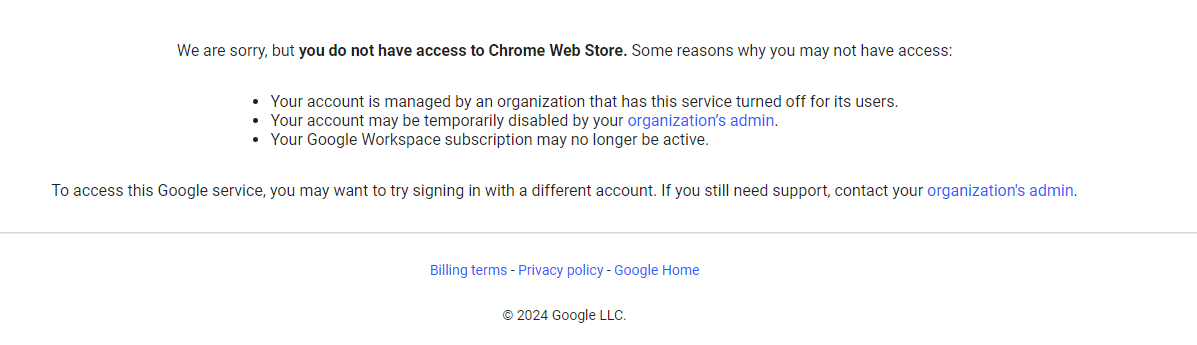
If you are experiencing an issue accessing the Chrome Web Store and receive the below message, it is likely you may be signed into Google Chrome with your Park University Google account. The Chrome Web Store is not accessible when logged into Google Chrome with your Park University Google account.
Please log into Google Chrome with an alternate, non-Park University Google account.
Honorlock Protects Privacy
https://honorlock.com/studentprivacy/
Student Resources
Honorlock Student Tutorial
Minimum System Requirements
https://honorlock.kb.help/minimum-system-requirements/
How To Use Honorlock (Test Takers)
https://honorlock.kb.help/how-to-use-honorlock-test-takers/
Top Student FAQs
https://honorlock.kb.help/honorlock-faqs-for-test-takers/
General Honorlock Student Resources
https://honorlock.com/tag/student-resources/
Test Taker - Quick Fixes
https://honorlock.kb.help/test-taker-quick-fixes/
Faculty Resources
Getting Started
https://honorlock.kb.help/getting-started-guide/
Standard Exam Guidelines
https://honorlock.kb.help/honorlock-standard-exam-guidelines/
Suggested Syllabus Verbiage
https://honorlock.kb.help/honorlock-suggested-syllabus-verbiage/
Reviewing Session Results Best Practices
https://honorlock.kb.help/reviewing-session-results-best-practices/
How to Interpret Flags
https://honorlock.kb.help/how-to-interpret-flags/
Understanding Analytics
https://honorlock.kb.help/course-analytics/
Quick Tip Videos
https://www.youtube.com/playlist?list=PLD7Pm1HsVW0Uf4GJuMkmVuj2DnjqZcBZI
Honorlock Accessibility Statement